
“What is MATLAB?” “How is it different from Python?” “Is it worth learning?” If you have just come across MATLAB, these are probably the first questions on your mind, and this article answers all of them in one place.
MATLAB is a numerical computing platform developed by MathWorks, used every day by millions of engineers and researchers around the world in their work and research (MathWorks Official).
This guide covers everything from its definition and main use cases to how it compares with Python, its future outlook, and how to start learning it.
- The basic definition of MATLAB and an overview of what it can do
- The differences between Python and MATLAB, and when to use each
- MATLAB’s future outlook and concrete steps to start learning it

1. What Is MATLAB? The Basics of a Numerical Computing Platform
MATLAB is a programming platform built specifically for numerical computing and algorithm development. Let’s break down the basics from three angles: the origin of its name, its development history, and the structure of its IDE.
The Name Means “Matrix Laboratory”: A Language Designed Around Matrices
MATLAB stands for “Matrix Laboratory.” As the name suggests, the core concept at the heart of the language is the matrix.
MATLAB is built on the idea of treating all kinds of data, including numbers, strings, and image data, uniformly as matrices.
For example, when defining a 3×3 matrix
In MATLAB, it takes just one line: A = [1 2 3; 4 5 6; 7 8 9]. Operations that would require nested loops in other languages can be expressed in a single step using matrix notation.
This ease of writing is a major reason MATLAB has long been popular with engineers and researchers working on numerical computation.
Under the hood, MATLAB uses BLAS (Basic Linear Algebra Subprograms) and LAPACK (Linear Algebra PACKage), the standard libraries for numerical linear algebra, so matrix operations run quickly and with high precision.
You can focus on engineering calculations and statistical analysis without worrying about low-level implementation details.
What Are BLAS and LAPACK?
BLAS and LAPACK are standard libraries for numerical linear algebra.
They execute calculations such as matrix multiplication, eigenvalue decomposition, and singular value decomposition with optimizations at the CPU instruction level. Because MATLAB uses them automatically, users benefit from fast computation without having to think about it.
Commercialized by MathWorks in 1984: Its History and Global Adoption
MATLAB’s origins date back to the late 1970s.
It began when Cleve Moler, a mathematician at the University of New Mexico, developed an interactive numerical computing program so that his students could run matrix operations without having to use FORTRAN.
Jack Little and others later redesigned it in the C language and made it much faster.
In 1984, Jack Little, Cleve Moler, and their colleagues founded MathWorks and launched MATLAB worldwide as a commercial product.
Since then, it has spread rapidly through universities, research institutions, and companies. As of 2019, it had more than 4 million users worldwide (Wikipedia statistics).
Today, it remains a standard tool across a wide range of industries, including automotive, aerospace, electronics, and medical devices, as well as at universities around the world.
In Japan, the University of Tokyo has a campus-wide license, so all enrolled students, faculty, and staff can use MATLAB and its Toolboxes free of charge.
(Source: University of Tokyo utelecon )
About Cleve Moler
Cleve Moler is a leading authority on numerical analysis who was also deeply involved in developing libraries such as LINPACK and EISPACK.
Known as the creator of MATLAB, he is still involved in its development today as Chief Mathematician at MathWorks.
A Programming Language With a Built-In IDE: MATLAB’s 4 Main Components
One of MATLAB’s defining features is that the language and the IDE (integrated development environment) come together as one package from the start.
Right after installation, you can write, run, and debug code and visualize data all on the same screen. There is no need to combine multiple tools to build an environment, as you would with Python or R.
The MATLAB IDE Consists of 4 Main Panels
Command Window
An interactive input panel where you can run code line by line and see results immediately. It is ideal for trying out calculations as you go.
Workspace
A panel that lists the variables defined in the current session along with their type, size, and value, so you can check their contents at a glance.
Editor
A code editor for writing, saving, and running multi-line scripts (.m files) and functions. It includes debugging features such as syntax highlighting, breakpoints, and step-by-step execution.
Current Folder
A panel for working with files through the GUI. You can manage scripts and data files with drag and drop.
There is also a feature called the Live Editor. It lets you write and run code, results, and explanations (text, equations, and images) together in a single document, making it the MATLAB equivalent of a Jupyter notebook.
It is widely used for course materials and research notes.
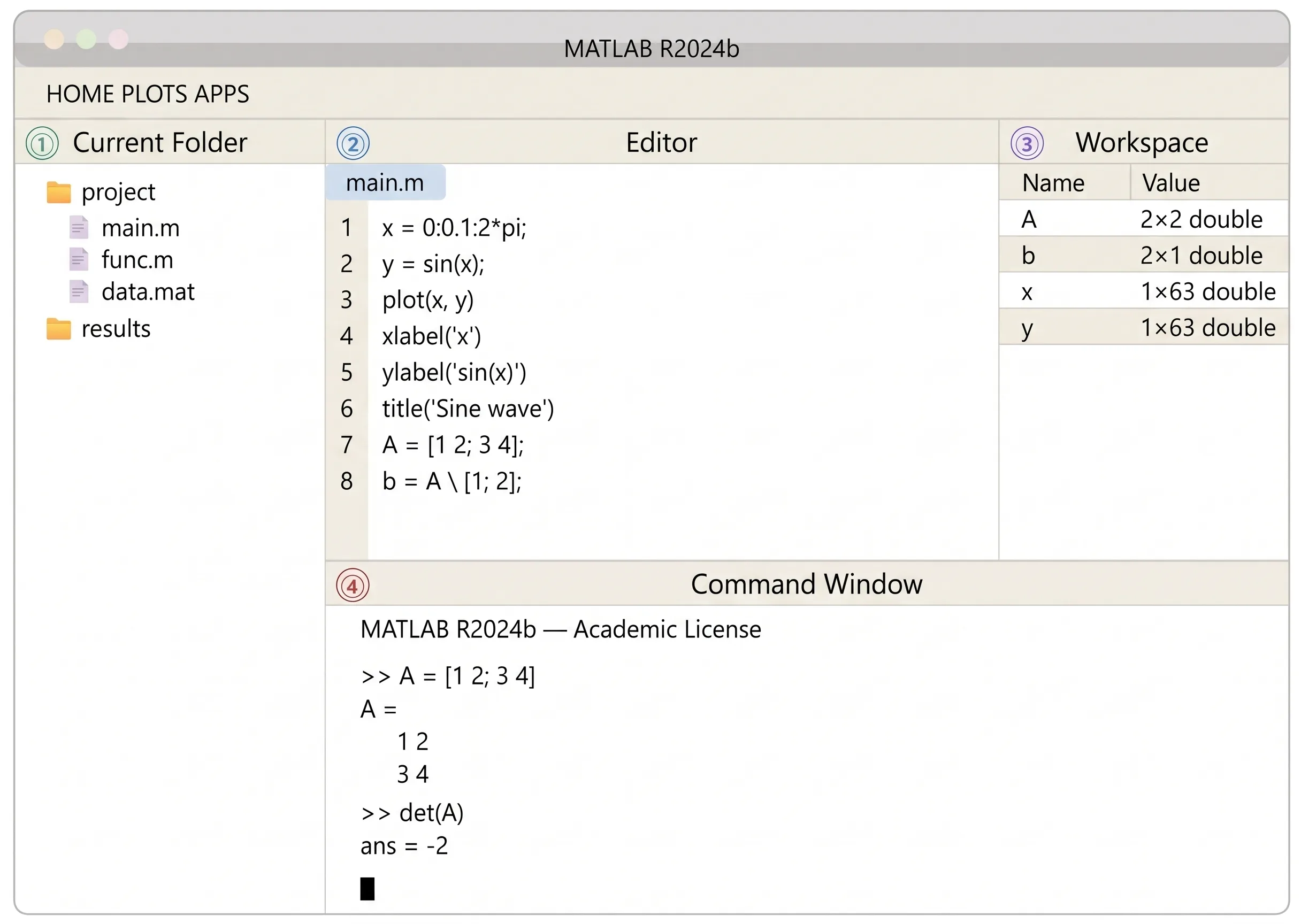
MATLAB IDE layout (4 components: Command Window, Workspace, Editor, and Current Folder)
When to Use the Live Editor
Because the Live Editor lets you embed intermediate results as graphs while you write, it also works well for lab notebooks and technical reports.
Like a Jupyter Notebook, it lets you record and share formulas and output graphs together.
■ Looking for MATLAB or Engineering Roles in Japan?
BLOOMTECH Career for Global supports engineers living in Japan with Japanese at JLPT N2 level or above. If you want to put your numerical computing, simulation, or development skills to work at a Japanese company, our career advisors will help you find positions that match your experience and goals.
▼Contact BLOOMTECH Career for Global here
2. What You Can Do With MATLAB: 7 Key Areas of Use
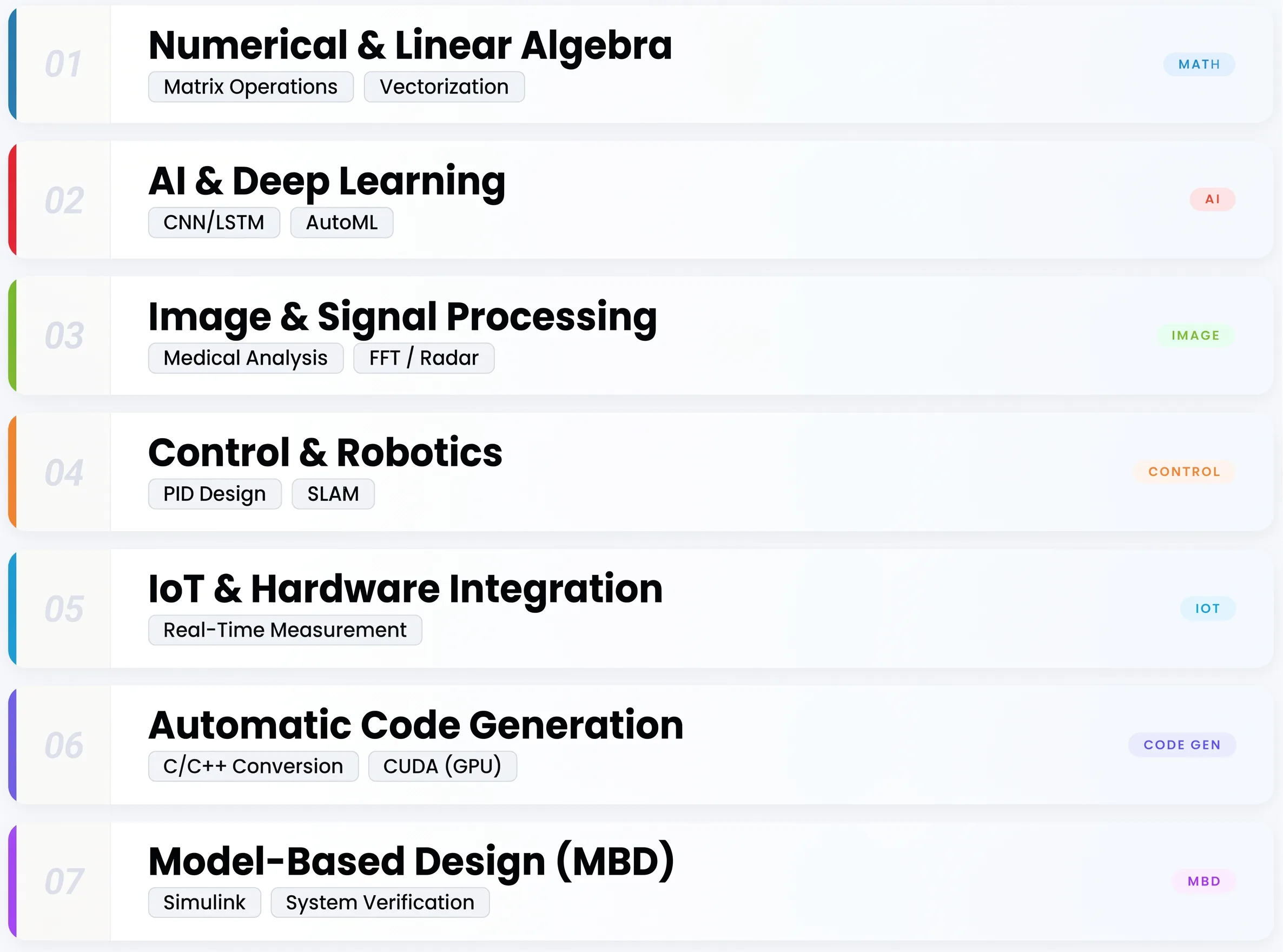
Here we look at the kinds of real problems MATLAB is used to solve, grouped into seven representative areas.
Exceptionally Fast Numerical Computing and Linear Algebra: MATLAB’s Core Strength
MATLAB’s greatest strength is the speed and simplicity it brings to numerical computing and linear algebra. Operations such as matrix multiplication, matrix inversion, eigenvalue decomposition, and singular value decomposition can be implemented in just a few lines of code.
For example, multiplying two matrices A and B takes only one line: C = A * B.
Because BLAS and LAPACK handle the processing internally using the CPU’s parallel instructions, large-scale matrix operations can run several to dozens of times faster than the same logic written as for loops in Python.
You can speed things up even further with vectorization, which means writing operations as matrix calculations instead of loops.
What Is Vectorization?
Vectorization is a way of writing code that processes data all at once as matrix or array operations, rather than one element at a time with a for loop.
MATLAB runs vectorized operations with internal multithreading, so they run faster than explicitly written loops.
Implement AI and Deep Learning With Standard Toolboxes
MATLAB also provides a powerful environment for implementing AI, machine learning, and deep learning. The two main tools are the Deep Learning Toolbox and the Statistics and Machine Learning Toolbox.
Deep Learning Toolbox
This toolbox lets you design, train, and evaluate models such as convolutional neural networks (CNNs) and recurrent neural networks (LSTMs) through a GUI.
It comes with ready-to-use features for real-world tasks such as image classification, object detection, anomaly detection, and building predictive models.
Statistics and Machine Learning Toolbox
This toolbox gives you access to a wide range of standard machine learning algorithms, including support vector machines (SVMs), decision trees, and clustering.
Because MathWorks provides quality assurance and official support for these Toolboxes, they offer greater stability and reproducibility than open-source libraries, which makes them well suited to industrial applications where reliability is essential.
(Source: MathWorks Official )
Key Features of the Deep Learning Toolbox
The Deep Learning Toolbox covers everything needed for professional-grade deep learning development, including importing TensorFlow and PyTorch models, transfer learning, automatic hyperparameter optimization, and fast GPU-accelerated training.
▼Related Reading
Building models is only half the job. See how MLOps engineers run ML in production, and what they earn.

A Long Track Record in Image Processing and Signal Processing
MATLAB has decades of proven use in image processing and signal processing.
Image Processing Toolbox
This toolbox provides a rich set of functions for core computer vision tasks such as image filtering, morphological processing, feature extraction, and segmentation.
It is also widely used to analyze medical images such as MRI and CT scans, and it can read DICOM files directly to visualize and analyze them as 3D data.
Signal Processing Toolbox
This toolbox covers the core functions of signal processing, including FFT (Fast Fourier Transform), filter design, spectral analysis, and wavelet transforms.
It has an extensive track record in the defense, aviation, and telecommunications industries for designing radar signal processing, sonar, and wireless communication systems.
An Essential Tool for Control System Design and Robotics Development
In control engineering, MATLAB is the industry-standard tool.
Using the Control System Toolbox
You can carry out the full control design workflow, including PID control, state feedback control, and loop shaping, using both commands and a GUI.
Analysis plots such as Bode plots, root locus plots, and Nyquist plots can each be generated with a single function.
Defining a plant model’s transfer function, automatically calculating PID gains with the pidtune function, and checking the step response with the step function can all be done in just a few lines of code.
Using the Robotics System Toolbox
You can implement kinematics and dynamics calculations, path planning, and SLAM (simultaneous localization and mapping) for robot arms and mobile robots in MATLAB.
It also integrates with ROS, supporting data communication with and control of physical robots.
(Source: MathWorks Official)
Process Real-Time Data Through IoT and Hardware Integration
MATLAB is not limited to software-based numerical computing. It also supports real-time integration with physical hardware.
With the support packages for Arduino and Raspberry Pi, you can collect data in real time from sensors connected to a microcontroller board (temperature, acceleration, distance, cameras, and more) and visualize and analyze it in MATLAB.
With the MATLAB Mobile smartphone app, you can also send data from your phone’s accelerometer, GPS, camera, and other sensors to the MATLAB cloud and process it in real time on your PC.
This is useful when you want to prototype an IoT system or quickly try collecting and visualizing sensor data.
(Source: MathWorks Official )
How MATLAB Mobile Works With MATLAB Drive
MATLAB Mobile is linked to MATLAB Drive, a cloud storage service.
Data collected on your smartphone can be shared with desktop MATLAB through the cloud, creating a seamless link between data collection in the field and detailed analysis back at the office.
Generate C/C++ Code Automatically for Embedded Systems
Automatic code generation with MATLAB Coder is one of MATLAB’s biggest strengths.
Algorithms written in MATLAB can be converted automatically into C/C++ code, which can then be used directly in embedded systems and real hardware.
Traditional Development vs. the New Approach
Traditionally, after a prototype was built and validated in MATLAB, engineers had to rewrite it by hand in C/C++.
MATLAB Coder eliminates that step, greatly shortening development time from prototype to implementation.
It is widely used in embedded systems that require real-time processing, such as medical devices, automotive ECUs (electronic control units), and industrial machinery.
MATLAB Coder vs. GPU Coder
While MATLAB Coder generates C/C++ code for CPUs, GPU Coder converts algorithms into CUDA code that runs on GPUs.
For workloads that benefit from parallel processing, such as deep learning inference and real-time image processing, GPU Coder can significantly boost processing speed on the actual hardware.
▼Related Reading
MATLAB Coder outputs C for embedded systems. Learn why C has been the system development standard for 50 years.
Model-Based Development (MBD) With Simulink Is the Standard in Automotive and Aerospace
Simulink, which is used together with MATLAB, is a tool for modeling systems visually as block diagrams and running simulations.
By adding Simulink, you can verify how control algorithms and physical systems behave without needing real hardware.
This simulation-based approach is called Model-Based Development (MBD), and it is widely adopted in fields such as automotive, aerospace, and railways.
Using Simulink Coder, you can automatically generate C/C++ code from simulation models and flash it onto real hardware such as ECUs (electronic control units), all in one continuous workflow.
It is widely known that automakers in Japan and overseas, including Nissan, have adopted MATLAB and Simulink for their MBD workflows.
Why MBD Became Widespread
The software controlled by the ECUs in a modern luxury car is said to run to hundreds of millions of lines of code.
Developing and verifying that much code by hand is not realistic, so automatic generation and verification through model-based development have become essential.
3. MATLAB vs. Python: Choosing by Use Case, Cost, and Support

MATLAB and Python are not rivals. Each is suited to different purposes. Let’s compare them along three axes: cost, specialty areas, and typical usage scenarios.
Python Wins on Cost and Accessibility, MATLAB on Reliability and Consistency
The most obvious difference between MATLAB and Python is cost.
Python is open source and free to use under a permissive, MIT-style license. MATLAB, on the other hand, is a commercial product from MathWorks, with fees that depend on the type of license: individual, student, or corporate.
Setting Up the Environment Is Also Different
With Python, after installing the language itself, you need to add libraries for your use case individually, such as NumPy, SciPy, Matplotlib, and Pandas, and manage their versions with tools like pip, conda, or venv.
MATLAB comes ready for numerical computing, plotting, and debugging right after installation, so setup effort is close to zero.
Because MathWorks provides quality assurance and official support for MATLAB Toolboxes, they are regarded as more stable, reproducible, and reliable than Python’s open-source libraries.
Where compliance with automotive functional safety standards (such as ISO 26262) is required, MATLAB Toolboxes tend to be the preferred choice.
Version Compatibility Issues
The Python ecosystem evolves quickly, so library updates can easily cause compatibility problems such as dependency conflicts.
Since MathWorks manages MATLAB centrally, code that works in a specific version runs reliably and reproducibly within that version.
MATLAB Suits Engineering Computation and MBD, Python Suits Web Development and General AI
The question is not which one is better. The right tool depends on what you want to do.
MATLAB was built specifically for numerical computing, control engineering, signal processing, and model-based development, and in these fields it has a major advantage in usability and reliability.
Python is strong across a broad range of uses, including web development, data engineering, machine learning, natural language processing, and web scraping.
The communities around deep learning frameworks such as TensorFlow and PyTorch have also grown up around Python, and much of the latest AI research is implemented and published in Python.
A common split in practice is that Python excels at flexible trial and error during research, while MATLAB is better suited to the rigorous verification needed to bring a product to market.
MATLAB also offers Python integration, and development styles that combine both are becoming more common.
▼Related Reading
Drawn to data work as well? This guide covers the data analyst role, salary, key skills, and roadmap.

MATLAB Dominates Research and University Education, While Startups and Individual Developers Prefer Python
Each tool tends to be favored in different settings. In research and university education, MATLAB is firmly established as a standard tool, as shown by the University of Tokyo’s campus-wide license.
MATLAB is often required for courses in control engineering, signal processing, and systems engineering, as well as for undergraduate and master’s theses. It also has an edge in compatibility with academic work, such as sharing .mat files and Simulink models.
On the other hand, startups and individual developers often find Python easier to choose because they can start at zero cost, and Python users far outnumber MATLAB users across the engineering community as a whole.
The current reality is that MATLAB/Simulink dominates at large manufacturing, automotive, and aerospace companies, while Python is mainstream in web development, startups, and personal projects.
The most sensible way to decide which to learn is to consider the career direction you are aiming for.
The table below summarizes the main differences between MATLAB and Python.
| Comparison | MATLAB | Python |
|---|---|---|
| License cost | Paid (individual, student, and corporate licenses available; may be free through a university campus-wide license) | Free (open source) |
| Environment setup | Ready to use right after installation, with the IDE and full toolset included | Requires installing libraries individually and managing versions on top of the language itself |
| Specialty areas | Numerical computing, control engineering, signal processing, MBD, embedded development | Web development, general-purpose AI, data engineering, natural language processing |
| Support | Official technical support and quality assurance from MathWorks | Mainly community-based (Stack Overflow, GitHub, etc.) |
| Learning curve | Relatively easy to learn with an engineering background; the large number of Toolboxes can make choosing difficult | Easy to start with plenty of beginner resources; the sheer number of libraries can be overwhelming |
4. The Future of MATLAB: Market Demand According to the Latest Data

Using three sources of data, language rankings, developer surveys, and industry trends, we look at MATLAB’s current market position and future demand.
Holding Its Place in the TIOBE Top 20: Market Share as a Programming Language
MATLAB has stayed within the top 20 of the TIOBE Index, a widely referenced measure of programming language popularity and usage, for many years.
The 2025 data also confirms steady demand for MATLAB as a language specialized in engineering and numerical computing.
While general-purpose languages such as Python, Java, and C/C++ occupy the top spots, MATLAB continues to maintain its own distinct demand as an engineering-focused tool.
The reason is that rather than competing with general-purpose languages for market share, MATLAB has a stable base of users who rely on it exclusively in their fields.
(Source: TIOBE Index )
How to Read the TIOBE Ranking
The TIOBE ranking does not measure a language’s quality or superiority. It measures how much content about that language exists on the web.
MATLAB’s continued place in the top 20 means that a steady number of users keep using it in education and industry around the world.
Steady Usage in the Stack Overflow Survey: How Developers Worldwide Rate It
The Stack Overflow Developer Survey, conducted every year, is a large dataset covering the languages, tools, and salaries of engineers around the world. The 2024 edition surveyed roughly 60,000 developers.
The survey reports a steady level of MATLAB usage, centered on professionals in scientific computing and engineering.
MATLAB users are concentrated in high-value industries such as manufacturing, research institutions, and aerospace, and their median salaries also tend to be relatively high.
Although its community is smaller than those of Python or JavaScript, the fact that relatively few people can use it proficiently helps support its market value.
(Source: Stack Overflow Developer Survey 2024 )
What Is the “Admired” Metric?
The “Admired” metric in the Stack Overflow survey is the percentage of engineers who currently use a language and want to keep using it.
MATLAB’s score is not higher than those of general-purpose languages, but many of its users keep using it because their work requires it, giving it a stable, loyal user base.
Demand for MBD Engineers Is Growing in Automotive, Aerospace, and Robotics
One important factor in MATLAB’s future is the automotive industry’s shift to EVs and progress in autonomous driving technology.
In electric vehicles and advanced driver assistance systems (ADAS), electronic control systems are becoming far more important, and demand for model-based development with MATLAB and Simulink is growing.
Digital Transformation (DX) Across Manufacturing Is Also a Tailwind
MATLAB/Simulink-based development environments are being used to digitalize manufacturing, including factory automation, robot adoption, and more advanced quality control.
In aerospace, MATLAB is also used as a design tool for flight control systems and GNC (guidance, navigation, and control) systems, and demand continues in the defense and space sectors.
How Autonomous Driving and MBD Are Connected
Autonomous driving systems are made up of many subsystems, including sensor fusion, path planning, and control algorithms.
The workflow of modeling these in Simulink, running large-scale virtual verification in simulation, and then generating code to deploy on real hardware offers advantages in both development efficiency and safety, and it is being adopted by automakers across the industry.
MATLAB Engineer Salaries and Job Trends: The Market Value of MBD Skills
Demand for engineers with MATLAB and Simulink skills is also rising in Japan’s job market.
In particular, if you build your career as an MBD engineer in automotive, aerospace, or robotics, you can expect high market value because few people have these skills.
Job Market Overview
Automakers and major Tier 1 suppliers are continuously hiring MBD engineers, and many job postings for roles such as embedded software development, control system design, and HIL (Hardware-in-the-Loop) testing explicitly list MATLAB/Simulink skills in their job descriptions (JDs).
In the freelance market, MBD-related projects also tend to offer relatively high rates.
Unlike web and app development, MATLAB remains a field where few people have mastered it, making skilled engineers scarce. Combining engineering knowledge with MATLAB skills makes it easier to build a career as a specialist with little competition.
Skills That Raise Your Market Value as an MBD Engineer
Beyond basic MATLAB/Simulink skills, engineers with knowledge of the AUTOSAR standard, experience building HIL test environments, and experience with ISO 26262 (functional safety) are especially valued in the automotive industry.
Learning these together with the fundamentals of control engineering and signal processing makes them even more effective.
▼Related Reading
Rare skills like MBD raise your value. See which roles and routes help engineers in Japan reach ¥10M a year.

■日本でエンジニアとしてキャリアアップしたい方へ
海外エンジニア転職支援サービス『 Bloomtech Career 』にご相談ください。「英語OK」「ビザサポートあり」「高年収企業」など、外国人エンジニア向けの求人を多数掲載。専任のキャリアアドバイザーが、あなたのスキル・希望に合った最適な日本企業をご紹介します。
▼簡単・無料!30秒で登録完了!まずはお気軽にご連絡ください!
Bloomtech Careerに無料相談してみる
5. MATLAB Pricing and Licenses: How to Choose as an Individual, Student, or Business

Here we introduce the types of licenses available and ways to try MATLAB without spending any money.
Three Types of Licenses: Individual, Student, and Campus-Wide
MATLAB offers several types of licenses depending on your purpose and situation. The official MathWorks website mainly offers the following three categories.
Individual License
A license for individual users who are not affiliated with a company.
In addition to MATLAB itself, you can purchase the Toolboxes you need. It costs less than a corporate license, but companies are generally not permitted to use individual licenses for business purposes.
Student License
A license for students enrolled at accredited universities and educational institutions. It is cheaper than an individual license and comes bundled with MATLAB and major Toolboxes. You can use it for graduation research, coursework, and self-study.
Campus-Wide License
An institutional license adopted by a university or research institution as a whole. The University of Tokyo has introduced this license university-wide, so enrolled students, faculty, and staff can use MATLAB and nearly all Toolboxes at no extra cost.
For businesses, quote-based enterprise licenses are also available, priced according to the number of users, use case, and scale.
(Source: University of Tokyo utelecon )
About License Costs
Specific prices can be checked on the official MathWorks website (they vary by exchange rate, version, and license type).
Student licenses are often much cheaper than individual licenses, so the cost barrier is relatively low if you start learning while still in school.
Try It for Free With MATLAB Online and the Free Trial
If you just want to try MATLAB first, there are several ways to do so at no cost.
Free Trial
If you apply through the official MathWorks website, you can use MATLAB and major Toolboxes free of charge for a limited period (usually 30 days). No credit card registration is required, so it is easy to give it a try.
MATLAB Online
A cloud version that runs MATLAB in your browser. Once you create a MathWorks account, you can use MATLAB’s basic features without installing anything.
Paid plans are the norm, but in some cases a limited free tier is available to account holders.
(Source: MathWorks Official )
MATLAB Onramp
A free online introductory course provided by MathWorks.
The curriculum lets you learn by actually running MATLAB code in your browser, so you can start learning even without a license. It takes about two hours and systematically covers basic operations, matrix calculations, and plotting.
(Source: MathWorks Official Onramp )
Creating a MathWorks Account
A MathWorks account is free to create and lets you manage access to MATLAB Online, Onramp, and the official documentation in one place.
6. How to Learn MATLAB: The Fastest Roadmap for Beginners
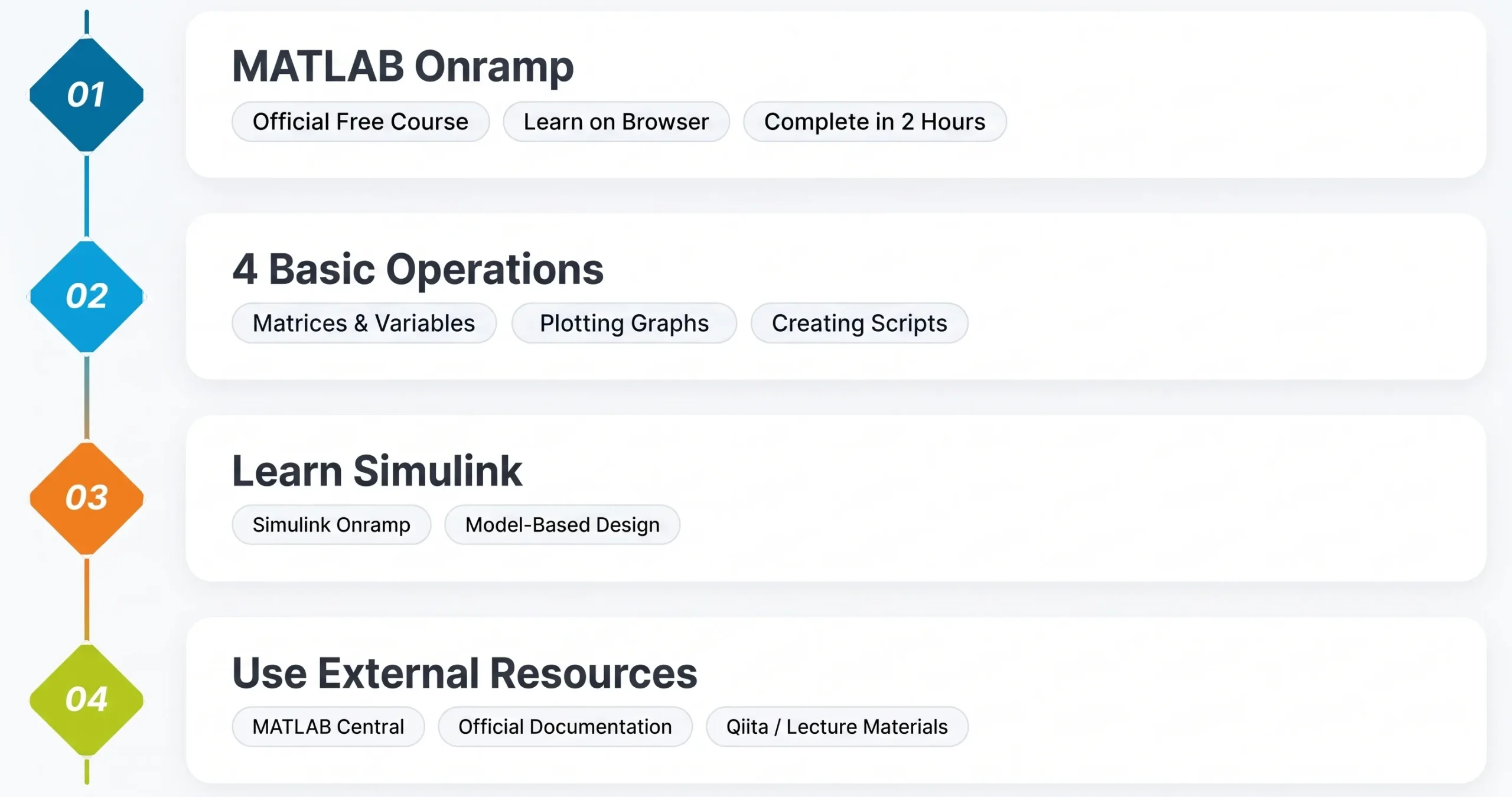
We walk through the learning process step by step, from the official free course and basic operations to Simulink and other useful resources.
The Official Free Course “MATLAB Onramp” Is the Most Efficient Way to Start
If you are starting to learn MATLAB, the first thing to tackle is “MATLAB Onramp,” the official free online introductory course from MathWorks.
MATLAB Onramp is a course where you learn by actually running MATLAB code in your browser. No installation or license is required. As long as you have a MathWorks account, you can start right away for free.
It takes about two hours and systematically covers the fundamentals you will need on the job, including basic operations, working with variables and matrices, writing scripts, and creating plots.
The course is designed around a repeating cycle of concept explanation, entering and running code, and instant feedback, so you can progress efficiently even on your own.
If you are new to MATLAB, start by completing this course.
(Source: MathWorks Onramp)
Next Steps After Completing MATLAB Onramp
After finishing Onramp, you can study specific areas systematically by moving on to the MATLAB Fundamentals course (paid), also offered through MathWorks Academy, or the Toolbox-specific Onramp series (such as Deep Learning Onramp and Signal Processing Onramp, all free).
Master 4 Basics to Get Started: Matrices, Variables, Plots, and Scripts
To use MATLAB at work, the four basic operations to learn first are defining matrices, working with variables, creating plots, and writing scripts.
Once you have these four down, you will be able to handle much of your numerical computing work in MATLAB.
Defining Variables and Matrices, and Creating Plots
To define variables and matrices, simply type a = 5 or A = [1 2; 3 4] in the Command Window.
No type declarations are needed; the type is determined automatically when you assign a value. For plotting, a single line, plot(x, y), displays a line graph, and you can add labels and a title with the xlabel, ylabel, and title functions.
Measuring Execution Time and Vectorization
A practical tip for real work is measuring execution time with tic/toc. Start a timer with tic and display the elapsed time with toc. It is handy for pinpointing slow parts of your code.
Writing code with vectorization (matrix operations) instead of for loops greatly improves processing speed. For example, squaring each element runs quickly when written as B = A.^2.
When to Use Scripts vs. Functions
In MATLAB, you can define scripts (which describe a sequence of steps) and functions (reusable routines with inputs and outputs) as .m files.
Making a habit of moving code into a script once it gets long, and into a function file when you call the same process repeatedly, results in code that is easier to maintain.
“Simulink Onramp” Is the Fastest Way to Start Learning Simulink
Once you have a solid grasp of MATLAB basics, the next step, if you plan to move into MBD (model-based development) or control system design, is to learn Simulink.
Since MATLAB and Simulink are separate products (their roles are explained in Section 7), it is most efficient to learn them in order.
The most recommended introduction to Simulink is “Simulink Onramp,” offered free of charge by MathWorks. Like MATLAB Onramp, it lets you learn by working with Simulink block diagrams in your browser.
Taking it after you are comfortable with MATLAB’s basic operations will help you progress smoothly.
(Source: MathWorks Simulink Onramp )
How to Decide When to Learn Simulink
If you are aiming for control engineering, automotive, or aerospace, it is best to learn Simulink early, alongside MATLAB.
If your main uses are data analysis, signal processing, or AI, it is fine to master MATLAB itself first and then move on to Simulink.
Broaden Your Learning With Books, Communities, and University Materials
After finishing MATLAB Onramp, there are plenty of resources to take your learning further.
Official Documentation and MATLAB Central
The most reliable primary source is the official MathWorks documentation.
It details the specifications, usage examples, and inputs and outputs of every function, and it is available in Japanese as well. When you need to look something up at work, this should be your first stop.
On MATLAB Central, run by MathWorks, you can access code, questions, and answers posted by users around the world, and on File Exchange you can download useful scripts for free.
Qiita, Books, and University Materials
Qiita, a popular Japanese tech knowledge-sharing community, hosts many practical MATLAB articles, tips, and code examples that are useful for beginners and intermediate users alike.
University materials are also valuable learning resources, and some science and engineering universities publish the MATLAB lecture materials they use in class.
For systematic study, introductory books published by MathWorks and specialized MATLAB books from Japanese science and engineering publishers are helpful.
Much of the latest news and detailed technical information about MATLAB is published in English, so making use of the MATLAB Central forums and the official YouTube tutorial videos will broaden your learning even further.
7. The MATLAB Ecosystem: What to Know Before You Adopt It

Let’s clarify where MATLAB itself, Simulink, Toolboxes, and the cloud environments each fit, so you can use this as a reference when adopting and choosing tools.
Simulink Is a Separate Product From MATLAB, and Shines When Used Together With It
MATLAB and Simulink are often talked about as a single tool, but in terms of licensing, they are separate products.
A MATLAB license does not include Simulink. To use Simulink, you need to obtain a separate license or choose a bundle that includes it (such as the MATLAB & Simulink Student Suite).
The Different Roles of MATLAB and Simulink
MATLAB itself is an environment for writing code to develop algorithms, perform numerical computing and data analysis, create plots, and generate code (MATLAB Coder).
Simulink is an environment for visually modeling systems as block diagrams and running time-based simulations.
Use Cases Covered by MATLAB Alone vs. Those That Need Simulink
Tasks you can complete with MATLAB alone include data analysis, building machine learning models, signal processing, image analysis, and generating code for embedded systems.
Simulink becomes necessary when you want to model the dynamics of a control system as a block diagram, or when you need to verify an entire system through simulation as part of an MBD workflow.
Concrete Examples of Using MATLAB and Simulink Together
A typical example is loading the gains of a PID controller designed in MATLAB into a Simulink block, running a simulation, and then analyzing the results in the MATLAB workspace. Because the two share workspace variables, they work together seamlessly.
Toolboxes Are Add-On Packages You Buy Only for the Areas You Need
Toolboxes are paid optional packages that add features for specialized areas not covered by MATLAB itself.
MATLAB alone can handle basic numerical computing, plotting, and running scripts, but specialized work such as deep learning, signal processing, and control design requires the corresponding Toolbox.
The main Toolboxes, organized by area, are as follows.
| Area | Key Toolboxes | Main Uses |
|---|---|---|
| AI and machine learning | Deep Learning Toolbox / Statistics and Machine Learning Toolbox | Designing and training neural networks; classification, regression, and clustering |
| Image processing | Image Processing Toolbox / Computer Vision Toolbox | Filtering, segmentation, object detection |
| Signal processing | Signal Processing Toolbox / DSP System Toolbox | Filter design, FFT, spectral analysis |
| Control design | Control System Toolbox / Robust Control Toolbox | PID control, state feedback, loop shaping |
| Robotics | Robotics System Toolbox / ROS Toolbox | Kinematics, dynamics, path planning, ROS integration |
| Code generation | MATLAB Coder / Embedded Coder / GPU Coder | Automatic conversion to C/C++, CUDA, and embedded code |
| Communications and RF | Communications Toolbox / RF Toolbox | Communication system design, modulation, RF circuit analysis |
The basic rule is to choose Toolboxes based on what you want to do. There is no need to buy every Toolbox at once; selecting only the areas you need lets you control costs.
Trying Out Toolboxes
During the free trial, you can try many Toolboxes in addition to MATLAB itself. We recommend using this period to check in advance whether a given Toolbox fits your needs.
Use MATLAB From the Cloud and Mobile With MATLAB Online and MATLAB Mobile
MATLAB is not limited to the version installed on your PC. You can also use it from the cloud and your smartphone.
MATLAB Online
A cloud service that runs MATLAB in a web browser.
No installation is needed, and you can save and share files on MATLAB Drive, a cloud storage service. It is well suited to collaboration among multiple people, or to learning and trial runs without changing your PC’s environment.
It has also been adopted for online classes at educational institutions because it gives every student the same MATLAB environment.
MATLAB Mobile
An app for iOS and Android. When linked with MATLAB Drive, it lets you perform basic MATLAB operations, run commands, and access files from your smartphone.
It can also send data from your smartphone’s accelerometer, GPS, camera, and other sensors to the MATLAB cloud in real time.
Enterprise Deployment and MATLAB Drive
For large-scale deployment in companies, running MATLAB on cloud servers (for example, with MATLAB Parallel Server) is also an option.
Combined with deploying C/C++ code generated by MATLAB Coder onto embedded devices, this lets you handle everything from development and verification in the cloud to deployment on real hardware entirely within the MATLAB ecosystem.
Note that MATLAB Drive is a cloud storage service (with a storage limit) for saving and sharing MATLAB files (.m, .mat, .slx, etc.), and it is a separate service from MATLAB Central, which includes File Exchange.
8. Summary: Understand What MATLAB Is and Decide Your Next Step

MATLAB is a programming platform specialized in numerical computing and engineering simulation. It is not a competitor to Python; the two are used for different purposes depending on the use case and industry.
Industrial demand driven by model-based development and automatic code generation is expected to keep growing as EVs, autonomous driving, and manufacturing DX accelerate.
If you are a student, we recommend using your university’s campus license and starting with MATLAB Onramp. If you are a working engineer, check how MATLAB could apply to your work using the official documentation and free trial. And if you are an engineer considering a career change, start by searching for jobs and projects built around MBD skills as your next step.
▼Related Reading
Ready to put your MATLAB or MBD skills to work in a new role? Follow 8 steps to a successful job change in Japan.

■ Start Your Next Engineering Career in Japan With BLOOMTECH
Whether you work with MATLAB, Simulink, embedded systems, or AI, BLOOMTECH Career for Global is here to help. Our service is designed for engineers living in Japan with Japanese proficiency at JLPT N2 level or above. From choosing the right company to interview preparation and salary negotiation, our advisors support every step of your job change.
▼Contact BLOOMTECH Career for Global here