

As AI-powered development tools become increasingly widespread, GitHub Copilot — offered by GitHub — has drawn particular attention.
“I’m not sure how it actually works.” “There are multiple pricing plans and I don’t know which one to choose.” “I’m not confident it will actually improve my productivity.”
— This article is written for engineers and technology decision-makers who have questions like these. We cover everything from features and pricing to empirical data and risks.
- How GitHub Copilot works and its five key features
- The differences between individual and business pricing plans, and how to choose
- Empirical evidence of productivity gains, along with risks and considerations

1. What Is GitHub Copilot? | Defining the AI Pair Programmer and Its Origins
Let’s walk through the definition of GitHub Coplot and the technical foundations behind it.
It Is an AI-Powered Development Tool That Automatically Generates and Completes Code
GitHub Copilot is an AI-powered coding assistance service provided by GitHub. As developers write code, the AI predicts and suggests what should be written next, in real time.
“Copilot” is an aviation term meaning “co-pilot.” The name reflects the concept that the human developer remains in the pilot’s seat, with AI serving as a supporting role.
GitHub is a software development platform owned by Microsoft. GitHub Copilot was born from the combination of GitHub — the world’s largest code hosting service — and Microsoft’s partnership with OpenAI.
It Is Built on OpenAI’s Large Language Models
The technical foundation of GitHub Copilot is the large language model (LLM) developed by OpenAI.
Early versions used “Codex,” a model specialized for code generation, but the system has since evolved to incorporate GPT-4-class models and the latest OpenAI model series.
These models were trained on the vast collection of code repositories publicly available on GitHub. By learning from code patterns written by developers around the world, the model is able to deliver highly accurate, context-aware suggestions.
The key to suggestion quality is “context reading.” The model analyzes the contents of the currently open file, the cursor position, written comments, and more — synthesizing all of this to infer and propose the most appropriate code.
The technical details of how this works are covered in the next section.
▼Related Reading
GitHub is the platform that powers Copilot — but do you know how to actually use it? This beginner-friendly guide walks you through everything from Git setup to your first pull request.
2. How GitHub Copilot Works | How It Suggests Code

Here we explain what the AI does when you type code — how it reads context and what factors influence suggestion accuracy.
It Reads Code and Natural Language Comments in the Editor as Context
GitHub Copilot collects what the developer is typing in the editor as “context,” then infers what code should come next.
The information it collects includes the entire currently open file, the current cursor position, and any written comments or function names.
Code Is Generated Just From Writing a Comment
For example, simply writing # Function to read a CSV and convert it to a DataFrame in a Python file will automatically generate an entire function using the Pandas library’s DataFrame.
Because code appears from nothing more than a plain-language description of what you want, the speed from specification to implementation increases dramatically.
Accepting or Dismissing Suggestions Is a Single Keystroke
Suggestions appear in the editor as “gray ghost text.” The intuitive controls — Tab to accept, Escape to dismiss — make it easy to integrate into any development workflow.
Suggestion Accuracy Depends on Context Quality and the Language Being Used
Suggestion accuracy is directly influenced by the quality of the context provided.
The more specific and meaningful your variable names, function names, and comments are, the more accurately the AI can read your intent — and the better the suggestions become. Conversely, meaningless names like a or temp tend to degrade accuracy.
Suggestion quality also varies by programming language. Languages with large amounts of publicly available code on GitHub — such as Python, JavaScript, and TypeScript — benefit from richer training data and tend to yield higher-quality suggestions.
The metric that indicates how often suggestions are accepted is called the “Accept Rate.” This rate varies by language and use case — particularly high accept rates have been reported for JSON and Python used in test data generation.
This metric can also be used to measure the effectiveness of an organizational rollout.
3. Five Key Features of GitHub Copilot | A Complete Overview of What It Can Do
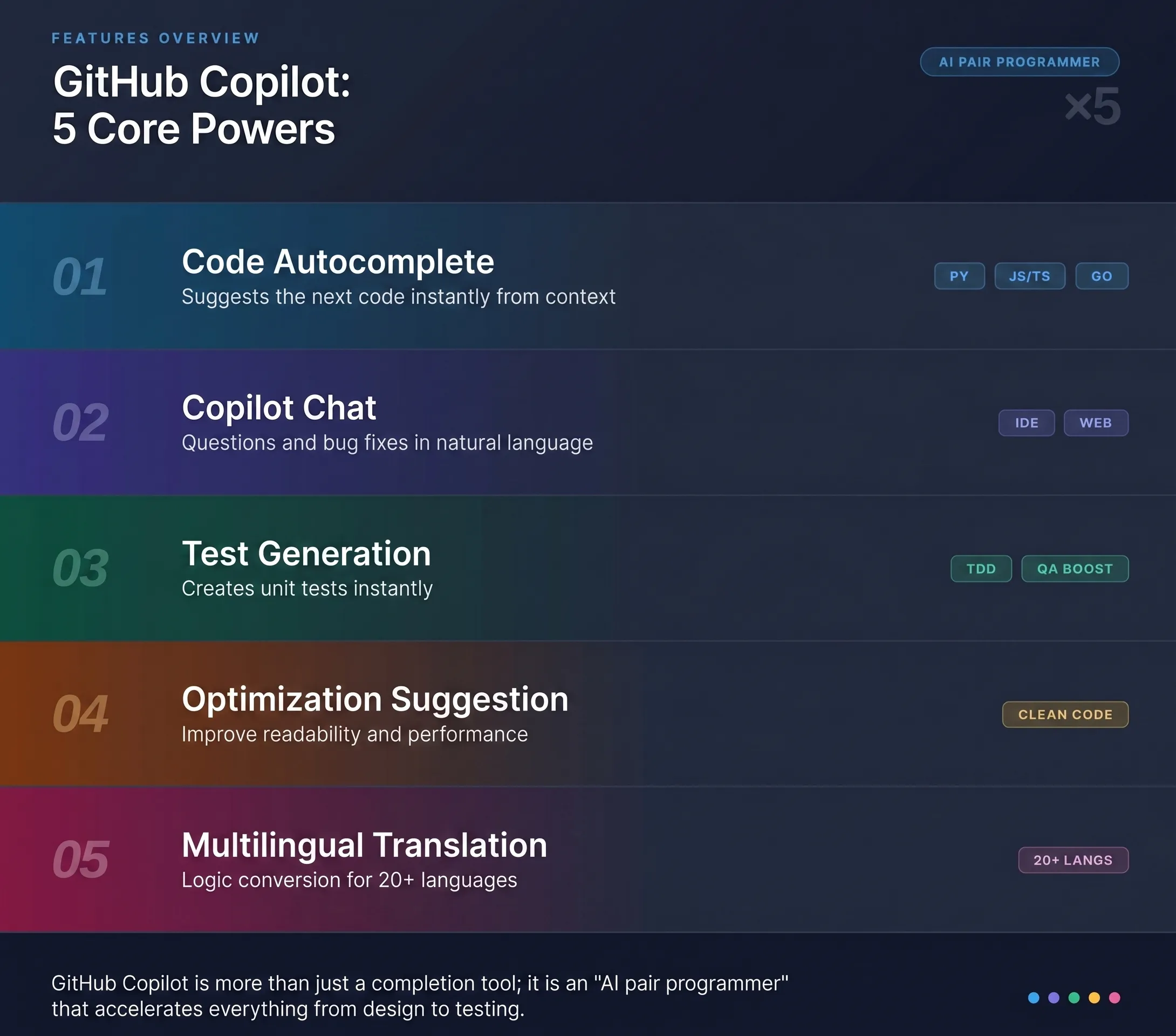
GitHub Copilot offers a wide range of features to support coding. Here is a breakdown of the five most notable ones.
Code Autocomplete | Predicts and Suggests What Comes Next as You Type
Code autocomplete is the core feature of GitHub Copilot.
Whether you’re mid-function definition, right after a variable declaration, or in the middle of a loop, Copilot reads the context and suggests what code should come next at virtually any point in the writing process.
Suggestions range from single-line completions to multi-line blocks and even entire function generation. Simply commenting “Function to fetch a paginated user list” can produce a complete function including API calls and error handling.
Key Supported Languages (Autocomplete)
- Python / JavaScript / TypeScript
- Go / Ruby / Java / C# / C++ / Swift
Chat (Copilot Chat) | Ask Questions and Generate Code in Natural Language
Copilot Chat lets you ask questions and make requests about code in natural language directly from a chat panel inside your IDE.
Simply type instructions like “Find the bug in this code,” “Explain what this function does,” or “Refactor this implementation,” and the AI will respond with answers, generated code, or suggested improvements.
It’s also available through the GitHub.com web interface, so you can use it from a browser without ever opening an editor. It’s especially useful during the design phase or when you need a quick answer on the fly.
Automatic Test Generation | Drastically Reduces the Cost of Writing Tests
This feature reads existing implementation code and automatically generates corresponding unit tests.
After writing a function or class, simply tell Copilot Chat “Write tests for this code” and it will generate tests covering both normal and edge cases.
For teams practicing test-driven development (TDD), this significantly reduces the upfront cost of writing tests. It also helps catch gaps in test coverage, contributing to overall code quality improvement.
Refactoring Suggestions | Improve Your Code for Better Maintainability
This feature analyzes existing code and proposes improvements for readability and performance.
Just type “Rewrite this to be more efficient” or “Improve the readability of this code” in Copilot Chat, and it will present concrete, improved code.
It can also be used to modernize long-accumulated legacy code, making it easier to address technical debt.
Multi-Language Support and Code Translation | Maintain Development Speed Even in Unfamiliar Languages
Copilot supports over 20 programming languages and includes a “code translation” feature that converts code written in one language into another.
If you want to rewrite a Python script in TypeScript, simply instruct Copilot Chat and the conversion is handled for you.
For engineers just starting to learn a new language, AI assistance with syntax reduces the time it takes to get up to speed.
Key Supported Languages (20+)
- Python / JavaScript / TypeScript / Java / C# / C++ / Go / Ruby / Swift / Kotlin / PHP / Rust, and more
4. GitHub Copilot Pricing Plans | Comparing All Four Plans for Individuals and Teams

Here we review the feature differences and pricing across all four plans to help you find the right fit for your situation.
There Are Four Plans: Free, Individual, Business, and Enterprise
Four plans are available to match different use cases and organizational scales. The table below compares each plan.
| Plan | Monthly Price (USD) | Target Users | Key Features |
|---|---|---|---|
| Free | Free | Individuals (with usage limits) | Monthly limits on completions and chat |
| Individual | $10/month or $100/year | Individual developers | Unlimited completions and chat, CLI support, and more |
| Business | $19/month/user | Teams and organizations | Admin console, SSO, and policy controls included |
| Enterprise | $39/month/user | Large enterprises | Advanced security, customization, and fine-tuning support |
※ Prices are listed in USD. Charges in other currencies will vary based on exchange rates. For the latest pricing and detailed feature differences, please refer to the official GitHub documentation.
(Source: GitHub Official)
▼Related Reading
Curious how GitHub fits into the broader IT job market in Japan? This guide breaks down which companies are actively using it and how GitHub proficiency affects your career prospects.

Students and Open Source Developers Can Use It for Free
There are programs that provide free access to users who meet certain criteria.
Free Access for Students via GitHub Education
Currently enrolled students can use GitHub Copilot Individual for free through the “GitHub Education” program. Completing student verification (the Student Developer Pack) using enrollment information is required.
Having access to AI coding assistance at no cost while learning to program is a significant advantage in terms of reducing the cost of education.
Free Access for Verified Open Source Contributors
GitHub Copilot is also provided free of charge to maintainers of verified open source projects who meet certain criteria — a way of giving back to the open source community.
Even those in the middle of a career change into engineering can take advantage of AI-powered learning tools at no cost, as long as they qualify for student verification.
For Enterprise Adoption, Start with the Business Plan
When considering adoption at the company or organizational level, the Business plan is the natural starting point.
Key Features of the Business Plan
The admin console lets you manage member usage in one place.
It includes SAML SSO support, content exclusion policies (settings to prevent Copilot from reading specific code), and other controls to align with your organization’s security requirements.
Key Differences Between Enterprise and Business
The Enterprise plan addresses more advanced needs, adding fine-tuning with your organization’s own codebase (custom model creation), integration with GitHub Advanced Security, and detailed audit logs.
It is well suited for industries with strict security requirements, such as finance and healthcare.
Plan Selection Guidelines
- Individuals or early-stage startups → Individual
- Team development or mid-sized organizations that need management features → Business
- Large enterprises with high security requirements → Enterprise
■日本でエンジニアとしてキャリアアップしたい方へ
海外エンジニア転職支援サービス『 Bloomtech Career 』にご相談ください。「英語OK」「ビザサポートあり」「高年収企業」など、外国人エンジニア向けの求人を多数掲載。専任のキャリアアドバイザーが、あなたのスキル・希望に合った最適な日本企業をご紹介します。
▼簡単・無料!30秒で登録完了!まずはお気軽にご連絡ください!
Bloomtech Careerに無料相談してみる
5. The Impact of GitHub Copilot | A 26% Increase in Productivity

Rather than relying on anecdotes or reviews, we examine the actual results based on data from academic research and official surveys.
A Peer-Reviewed Study Demonstrates a 26% Increase in Weekly Task Completion
The productivity gains from GitHub Copilot have been demonstrated in peer-reviewed academic research.
In a field experiment conducted with 4,867 developers at multiple large companies including Microsoft and Accenture, the group using GitHub Copilot completed an average of 26% more tasks per week.
The number of code updates (commits) and compilations also increased significantly, according to the study.
The research was published in Management Science, an international peer-reviewed journal in the field of business and management, making it a widely cited and highly credible source.
(Source: The Effects of Generative AI on High-Skilled Work / Management Science)
The Benefits Are Demonstrably Greater for Junior Engineers
What stands out in the same study is that the magnitude of the effect varies by years of experience.
Junior developers with less experience saw a substantial increase in pull request volume, while the increase for senior developers was comparatively modest.
This result suggests that GitHub Copilot plays a complementary role — using AI to fill “knowledge gaps.”
This is because the AI provides real-time support for the areas where junior engineers tend to get stuck, such as API usage, error handling, and writing tests.
Similar Trends Have Been Observed at Domestic Companies
Similar trends have been confirmed at companies in Japan as well. In an internal survey conducted by TIS Inc. among its engineers, approximately 80% of associate-level (junior) engineers reported feeling more productive.
(Source: Fintan / TIS “GitHub Copilot Adoption Status and Impact”)
GitHub’s Own Research Confirms a Dramatic Reduction in Task Completion Time
A study conducted by GitHub itself also found that time to complete the same task dropped significantly — from 2 hours 41 minutes to 1 hour 11 minutes — when using GitHub Copilot.
Additionally, 88% of developers who used GitHub Copilot reported feeling more productive.
(Source: GitHub Blog “Research: Quantifying GitHub Copilot’s Impact on Developer Productivity and Happiness”)
Accept Rate Varies by Use Case and Language
Regarding accept rates, an internal study by Insight Edge found particularly high rates when generating test data in Python and JSON — suggesting that focusing usage on specific languages and tasks can improve the accuracy of effectiveness measurement.
Adoption by Major Domestic Enterprises
Materials from Japan’s Ministry of Economy, Trade and Industry (METI) and IPA (Information-technology Promotion Agency) reference cases in which major domestic companies — including CyberAgent — have deployed GitHub Copilot at a scale of 500 or more users, leveraging quantitative metrics such as accept rate for ongoing operations.
(Source: METI “Digital Skill Standards: Engineering in the Generative AI Era”)
▼Related Reading
If productivity data has you thinking about your next career move, this guide covers the in-demand IT skills — including AI tooling — that Japanese tech companies are actively hiring for right now.

6. GitHub Copilot’s Supported Environments | Compatible Editors and Programming Languages
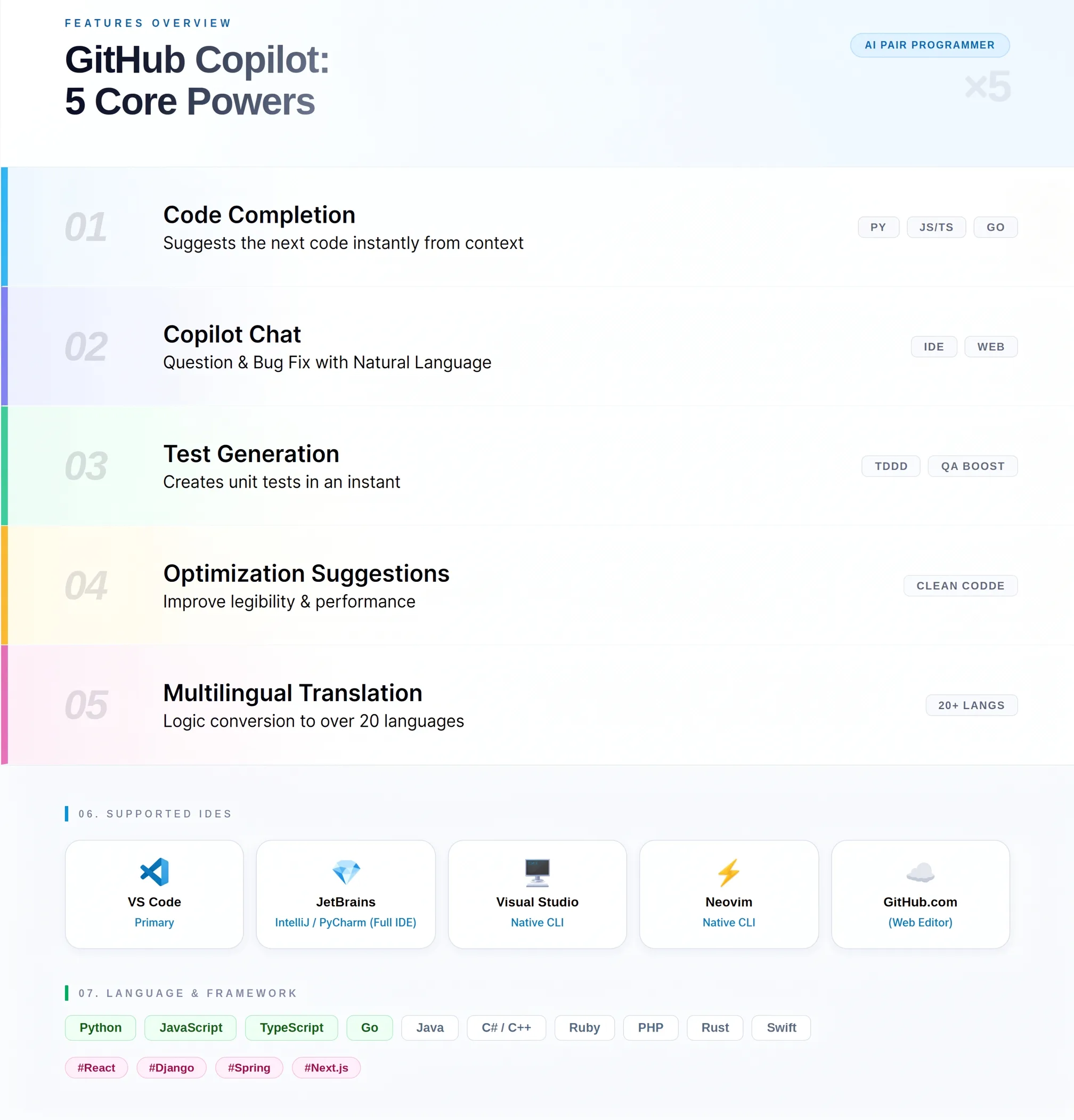
Here is a quick overview of which editors are supported and what programming languages are available.
Works with VS Code and Most Other Major IDEs
GitHub Copilot is not tied to any single editor — it works with most of the major IDEs widely used in today’s development environments.
Getting started is as simple as installing an extension (plugin), allowing you to integrate Copilot without changing your existing development setup.
Key Supported IDEs
- Visual Studio Code (VS Code)
- Visual Studio
- JetBrains IDEs (IntelliJ IDEA / PyCharm / WebStorm / GoLand, etc.)
- Neovim
- Eclipse
It is also available in GitHub.com’s web editor, so you can try it out in a browser without any local setup.
(Source: GitHub Official Documentation)
Supports Over 20 Programming Languages, with Particularly Strong Results in Python and JavaScript
While over 20 programming languages are supported, suggestion quality varies by language. Languages with a larger volume of publicly available code on GitHub benefit from richer training data and tend to receive higher-quality suggestions.
Key Supported Languages
- Python / JavaScript / TypeScript / Java / C# / C++ / Go / Ruby / Swift / Kotlin / PHP / Rust / Shell, and more
Framework and Library Support
Copilot also supports popular frameworks and libraries for supported languages. Autocomplete works with framework-specific code in React (JavaScript/TypeScript), Django (Python), Spring (Java), and more.
7. GitHub Copilot vs. Cursor vs. Claude Code | Comparing AI Coding Tools

We compare three competing AI coding tools to help you determine which one best fits your development style.
Deep Integration with the GitHub Ecosystem Is Copilot’s Greatest Strength
What differentiates GitHub Copilot most from other AI coding tools is its deep integration with the GitHub platform.
Beyond seamless connectivity with GitHub repositories, it integrates tightly with GitHub Actions for CI/CD and GitHub Advanced Security for security scanning — supporting the full lifecycle from code creation to quality assurance and deployment.
For organizations already using Microsoft tools like Azure DevOps and Visual Studio, the ability to connect immediately with existing infrastructure is a major advantage.
Cursor Is an AI-Native Editor; Claude Code Is Designed Around the CLI
The characteristics of all three tools can be summarized as follows.
| Category | GitHub Copilot | Cursor | Claude Code |
|---|---|---|---|
| Target Users | Existing IDE users and GitHub-centric organizations | Individual developers who want AI-first workflows | Engineers focused on CLI and scripting work |
| Key Features | IDE plugin + GitHub integration | AI-native editor based on VS Code | Terminal (CLI)-centered operation |
| Pricing | Free to $39/month/user | Free to $40/month | Usage-based (API pricing) |
| IDE Dependency | Added to your existing IDE | Requires the Cursor editor | IDE-independent (CLI) |
| Developer | GitHub (Microsoft) | Anysphere | Anthropic |
The Best Tool Depends on Your Development Environment and Use Case
Because these three tools are built around different design philosophies, choosing the one that fits your development style is what matters most.
Guidelines for Choosing
If you want to keep your existing IDE and development environment → GitHub Copilot
You can keep using VS Code or JetBrains as-is and get started with nothing more than a plugin installation.
If you want to build with AI conversation at the center of your workflow → Cursor
The editor itself is optimized for AI interaction, making it ideal for chat-driven development.
If your work is heavily terminal-based or script-focused → Claude Code
The style of calling AI from the CLI makes it a great fit for infrastructure work and batch processing.
There’s no need to commit to just one — using different tools for different purposes is a perfectly valid approach.
▼Related Reading
Choosing the right tools is part of building a high-value engineering career. This complete guide explains what it takes to become an AI engineer in Japan — from required skills to salary expectations.

8. GitHub Copilot Risks and Considerations | Three Key Concerns to Know Before Adopting
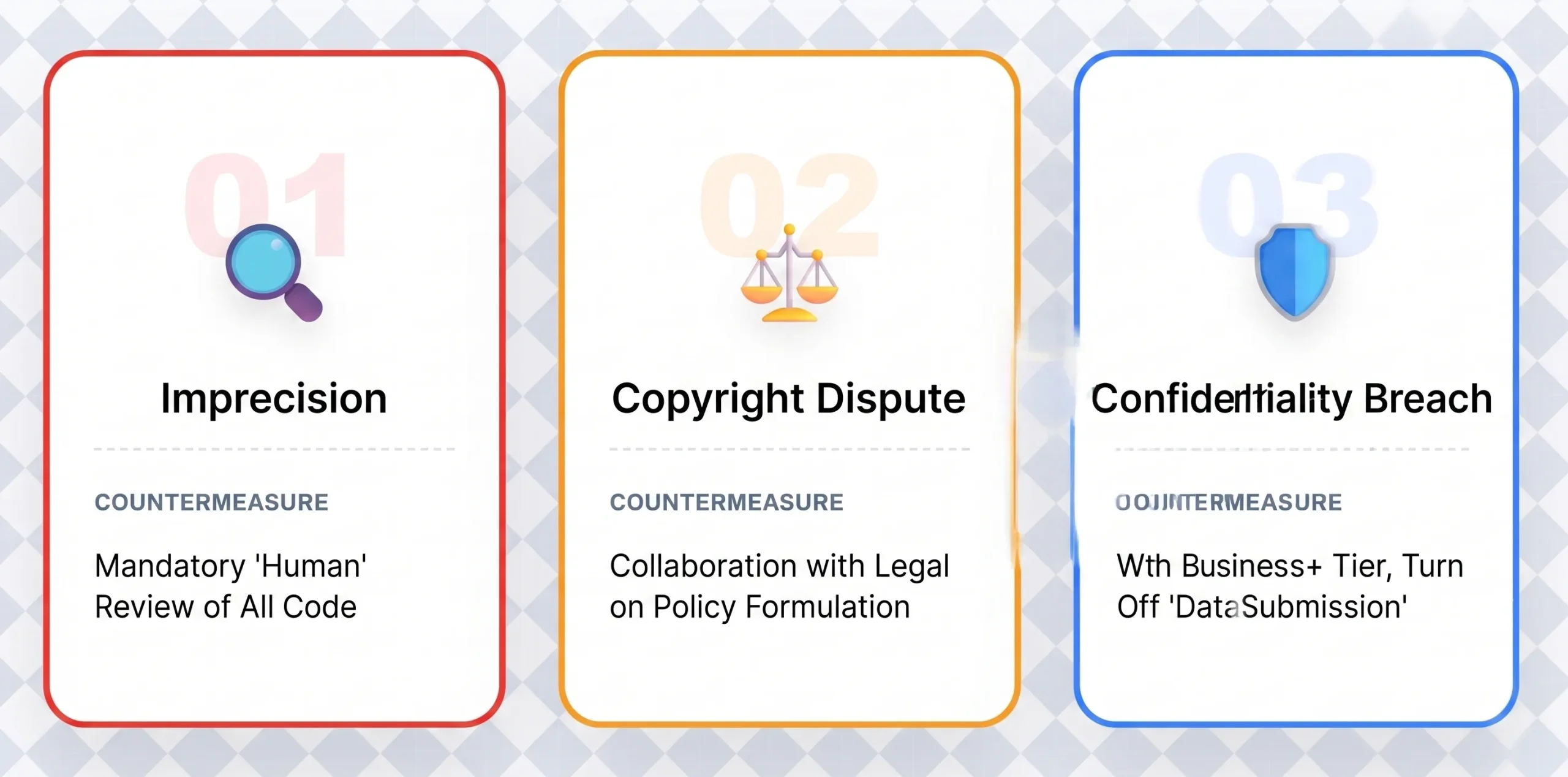
Before adopting GitHub Copilot, it’s important to understand the main risks and considerations involved.
AI-Suggested Code Always Requires Review — Accuracy Is Not Guaranteed
GitHub Copilot is a tool that makes “suggestions,” and it does not guarantee the accuracy of the code it proposes.
Suggested code may contain bugs, or it may generate code with security vulnerabilities.
Team Review Is Required Before Merging to Production
Responsibility for code quality always rests with the developer.
Even when using Copilot, the code review process cannot be skipped. It is strongly recommended that any code being merged to a production environment go through review by team members.
Debates Around Copyright and Training Data Are Ongoing
GitHub Copilot uses publicly available code on GitHub as training data. This has led to ongoing legal discussions around the interpretation of open source licenses and questions of copyright ownership.
Enterprise Use Requires Coordination with Legal Teams
While GitHub and Microsoft have stated that code generated by GitHub Copilot does not constitute copyright infringement, enterprise use still calls for careful attention to code provenance and license management.
It is recommended that adoption policies be determined in coordination with your organization’s compliance and legal teams.
The Risk of Sensitive Code Being Transmitted Externally Can Be Managed Through Settings
To improve suggestion accuracy, GitHub Copilot transmits portions of the code in your editor to its servers. This mechanism can introduce risk if sensitive or proprietary code is sent externally.
Code Transmission Can Be Disabled on Business Plans and Above
Business plans and above offer an admin setting to “disable code snippet collection,” which prevents your code from being used in model training.
Privacy policies differ between individual and business plans, so reviewing the official documentation before adoption is essential.
High-Sensitivity Industries Should Pair with the Enterprise Plan
For organizations in industries that handle highly sensitive information — such as finance, healthcare, or government — it is recommended to evaluate the Enterprise plan’s security features alongside your internal network architecture.
(Source: GitHub Official Documentation)
▼Related Reading
Before committing to any AI tool or new tech stack, it’s worth knowing what IT career paths are most in demand — and how your current skills map to salary growth in Japan’s tech market.

9. Getting Started with GitHub Copilot | Steps from Sign-Up to Your First Code Completion

Here we walk through the process step by step — from creating an account to installing the editor extension and experiencing your first code completion.
Create a GitHub Account, Select a Plan, and Sign Up
To get started, you’ll first need a GitHub account. If you already have one, you can skip this step.
Basic Sign-Up Steps
- Go to GitHub.com (https://github.com) and create an account
- Open “Settings” from the icon in the top right corner
- Select a plan from the “Copilot” menu and enter your payment information
- Once registration is complete, Copilot will be activated
The Free plan can be tried without entering payment information. Paid plans may include a free trial period — check the official documentation for the latest terms.
(Source: GitHub Official Documentation)
Install the Extension in VS Code and Start Using It Right Away
All it takes to get started is installing the editor extension. Here’s how to do it in VS Code.
Setup Steps for VS Code
- Open VS Code and click the “Extensions” icon on the left sidebar
- Type “GitHub Copilot” in the search bar and install the official extension
- Also install “GitHub Copilot Chat” to enable the chat feature
- After installation, sign in with your GitHub account to complete authentication
Once authenticated, open any code file and start typing a comment or function name — suggestions will appear as gray ghost text. You can try out the Tab to accept and Escape to dismiss controls right away.
Use Copilot Chat to Unlock More Advanced Capabilities
Once you’re comfortable with basic autocomplete, actively using Copilot Chat will significantly expand what you can do.
Common Chat Use Cases
- “What’s causing this error?” → Identify bugs and get fix suggestions
- “Write unit tests for this function” → Automatically generate test code
- “Rewrite this code from Python to TypeScript” → Code translation
Tips for Effective Prompting
The more specific and context-rich your instructions to Copilot Chat, the better the results.
Rather than “Fix this code,” try something like “Add error handling for when this function’s argument is None” — specifying concrete conditions and goals makes a noticeable difference.
For a more comprehensive guide, GitHub’s official learning resource “GitHub Resources” offers a structured Copilot learning path.
(Source: GitHub Resources)
10. Summary: What Is GitHub Copilot? | The AI Tool Redefining Developer Productivity
GitHub Copilot is an AI-powered development tool with five core capabilities: code autocomplete, chat, test generation, refactoring, and multi-language support.
As empirical research demonstrates — a 26% increase in weekly task completion — the benefits are especially pronounced for junior engineers. With four pricing tiers ranging from free to Enterprise for large organizations, the easiest way to start is with the free tier or student plan.
With thorough code review practices and appropriate security settings in place, consider how GitHub Copilot might fit into your development environment.
■ Ready to Put Your AI Development Skills to Work at a Top Japanese Tech Company?
GitHub Copilot can sharpen your coding speed — but finding the right company to grow in is just as important. BLOOMTECH Career for Global specializes in matching engineers who are based in Japan and have Japanese proficiency at N2 or above with leading tech employers that value modern development practices and offer real career advancement.
▼Contact BLOOMTECH Career for Global here